Our NetSuite bank feeds implementation has an important limitation: only one active linked account is supported per NetSuite instance at any one time. This constraint means that attempting to link a second account to a NetSuite instance will fail.
Instructions
Step 1: Delete the existing Merge shared secret in NetSuite
- Navigate to the list of record types
- You can go to Setup -> Lists, Records, & Fields -> Record Types
- Or type Record Types in the search bar and select Setup > Lists, Records, & Fields > Record Types
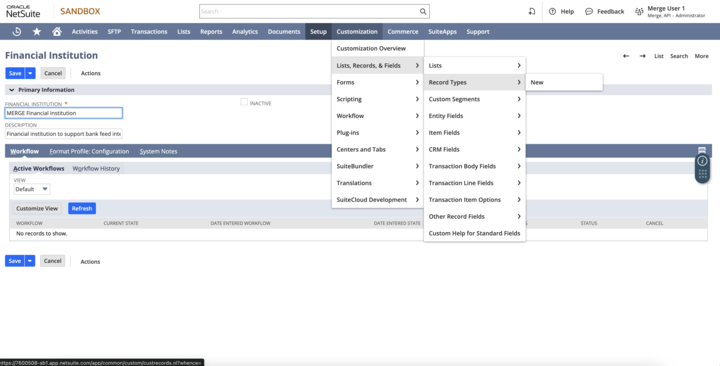
-
Find Merge Bank Feeds Secret and click List
- Click Edit
-
Click Actions -> Delete
Step 2: Delete the existing Merge base tenant url in NetSuite
- Navigate to the list of record types
- You can go to Setup -> Lists, Records, & Fields -> Record Types
- Or type Record Types in the search bar and select Setup > Lists, Records, & Fields > Record Types
-
Find Merge Base Tenant URL and click List
- Click Edit
- Click Actions -> Delete
Step 3: Delete the existing Merge shared secret in NetSuite
Delete, or archive + rename, any financial institution with the same name as “{your_organization_name} Financial Institution “
- Navigate to the list of financial institutions
- go to Setup -> Other Setup -> Financial Institution -> List
-
Or type Financial Institution in the search bar and select Setup > Other Setup > Financial Institution > List
- Find the problematic financial institution, click Edit
- rename it (e.g. name-inactive)
- check
inactive - Save
Step 4: Update your NetSuite Bank Feeds Bundle
- Login to your NetSuite instance and navigate to Customization -> SuiteBundler -> Search & Install Bundles -> List here
-
Find the Automated bank feeds bundle, click its green person/gear icon in the Action column on the left, and select Update
-
This will take you to the Preview Bundle Update confirmation screen. Click Update Bundle and the subsequent confirmation screen
- After you click Update Bundle, it will seem like NetSuite isn't doing anything
Please wait on this page until NetSuite processes and start the request!
-
Back on the Installed Bundles page, you'll then see the Status of the bundle become Pending...
-
Once NetSuite has completed updating the bundle, you'll then see the green check mark - you've completed your Bank Feeds bundle update!
Step 5: Relink in Weel
- Go to https://app.letsweel.com/app/settings#integrations
- Start relinking process